🛠️ 1. Prerequisites
Ensure your local development environment has the following software installed:- .NET 8 SDK (Latest stable release)
- SQL Server (LocalDB, Express, or Enterprise Edition)
- IDE / Code Editor of your choice with C# development tools installed
⚙️ 2. Setting up appsettings.json
Navigate to your Web API root directory, open theappsettings.json file, and replace the placeholders with your own infrastructure credentials:
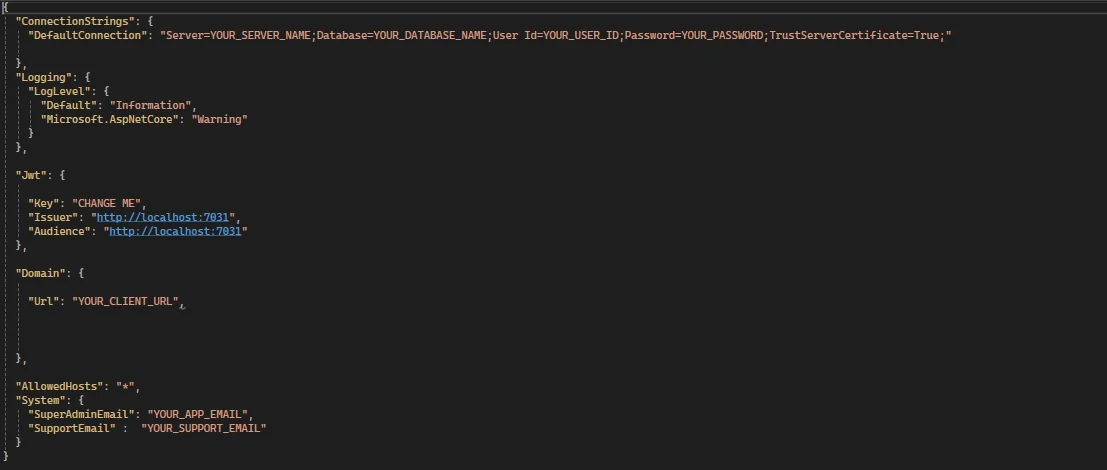
appsettings.json
- NOTE 1: The
Domain:Urlvalue must match your frontend application’s root URL exactly! - NOTE 2: The
System:SuperAdminEmailfield will be your initial Super Admin account username.
SameSite = Lax cookie policy for authentication tracking; if the root domains do not match perfectly, browsers will block all cross-origin authentication cookies instantly.
Production Example:
- API Domain:
api.yourdomain.com - Frontend Domain:
ui.yourdomain.com
yourdomain.com must be exactly the same.
🌐 Cross-Origin Resource Sharing (CORS)
InsideProgram.cs, the CORS policies dynamically evaluate incoming origin strings to securely whitelist the allowed subdomain-based tenant requests while sealing out malicious request injections:
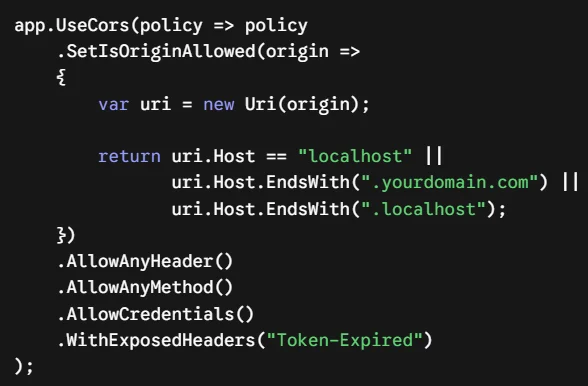
Program.cs
- NOTE 1: Replace
.yourdomain.comin the CORS policy with your own root domain address to match your frontend infrastructure.
🍪 Cookie Scope Allocation & Lax Security Policy
Within theTokenService layout, the ApplyDomainAndSecureSettings engine ensures that authentication scopes seamlessly persist across custom tenant subdomains by modifying cookie attributes:
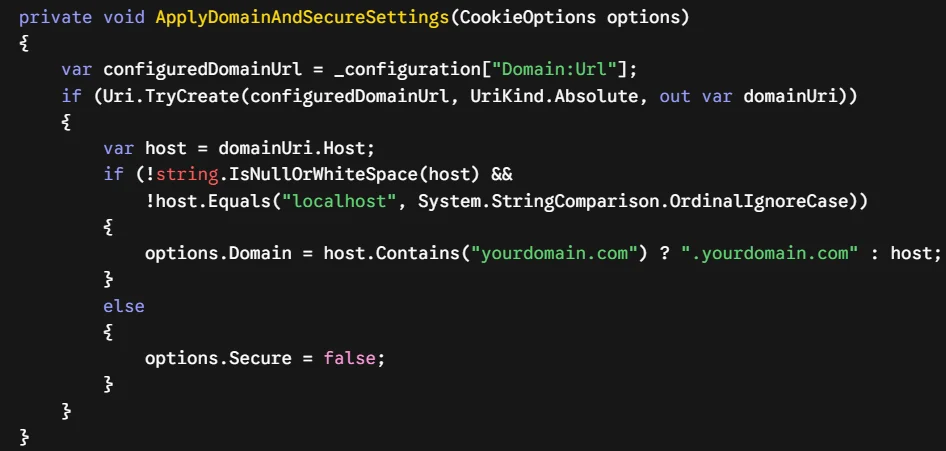
TokenService.cs
- NOTE 1: Ensure you replace
"yourdomain.com"and".yourdomain.com"inside the string evaluation with your own custom apex root domain address.
🏗️ 4. Applying Database Migrations
SaaSKit uses Entity Framework Core to orchestrate database modifications. Follow these steps to map the architectural schema directly to your target SQL Server instance:- Open your project solution in your preferred IDE.
- Open the Package Manager Console (via Tools -> NuGet Package Manager -> Package Manager Console).
- From the Default project dropdown menu inside the console, explicitly select
SaaSKit.DataAccessLayer. - Run the following standard migration targets to map your schema and create the database:
🌱 5. Automated Data Seeding Mechanics (DbSeeder)
SaaSKit contains an integratedDbSeeder.cs workflow situated directly within the DataAccessLayer. When the web API boots for the first time, the engine checks for an empty dataset and programmatically spins up the initial application context.
🚨 IMPORTANT LOCALHOST REQUIREMENT: You MUST launch the backend application locally using the HTTPS protocol at least once (e.g., https://localhost:7031). This is strictly required for the system to execute the initial setup and successfully write the seed data into your database.
🛂 Root Identity Generation
The seeder captures your declared configuration parameters to provision your global access credentials:- Super Admin Activation: Extracts your entry from
"System:SuperAdminEmail". If none is specified, it fallbacks ontosuperadmin@superadmin.com. - Initial Access Password: Instantiated globally with a default temporary password of
Admin123!. Change this credential immediately after logging into your admin panel dashboard. - Support Ticket Matrix: Assigns incoming customer care notifications directly to your custom set
"System:SupportEmail"gateway so that all support tickets are tracked successfully.
💾 Core Seed Entities Generated
During execution, the database engine will populate the following structural system constants:- Default Tenant Context: Configures the baseline tenant record used by the application and links your Super Admin account directly to it during the initial setup.
- Global App Settings & Themes: Deploys initial layout values utilizing a primary Indigo skin (
#4f46e5), Raleway typography frameworks, and defaults localized system structures (UTC,USD,yyyy-MM-dd). - SaaS Billing & Security Configurations: Toggles internal global states including default 14-day trials, standard billing switches, strict maximum sign-in limitation caps, and automatic internal system prefixing rules (
INV). - Action-Based Permission Engine: Maps out critical role operations including detailed fine-grained capability checks such as
subscription.upgrade,stripe.checkout.create,audit_log.read, and tenant-management related policies.
🛂 Initial Super Admin Credentials
The seeder captures your declared configuration parameters insideappsettings.json to provision your default root access profile:
- Username / Email: The exact value configured in your
"System:SuperAdminEmail"field (e.g.,admin@yourdomain.com). If left empty, it will default tosuperadmin@superadmin.com. - Default Password: Instantiated globally with the default static password
Admin123!. - Support Ticket Matrix: Assigns incoming customer care notifications directly to your custom set
"System:SupportEmail"gateway so that all support tickets are tracked successfully.